
Begin with coverage
A report with three maps does not establish attention across every scene. List the video’s scene boundaries, then mark where an analyzed frame is available. If a brief product reveal falls between samples, write “not analyzed” rather than borrowing a neighboring map.
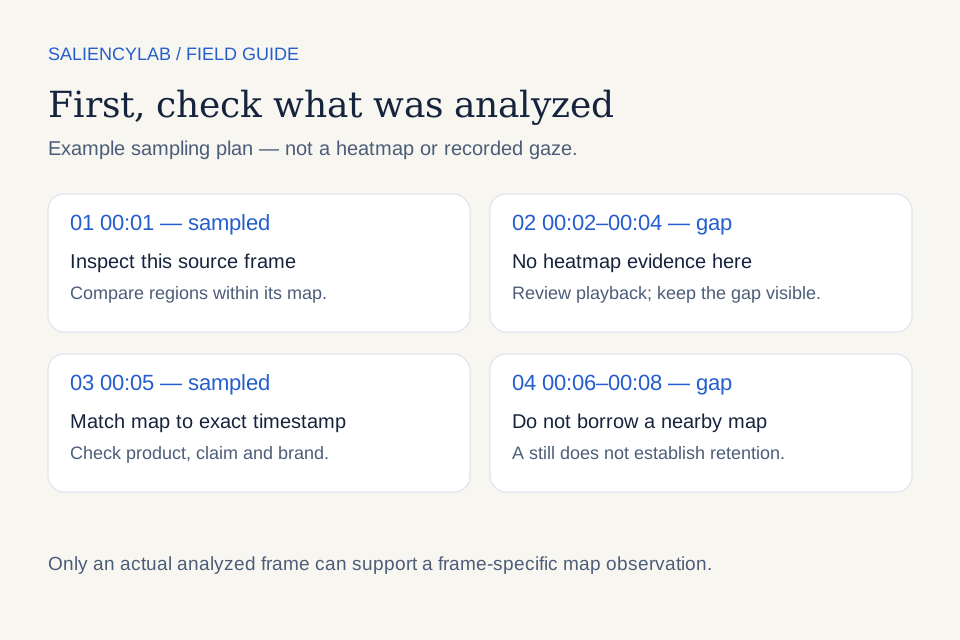
This is a sampling diagram, not a fabricated model output. A real overlay must come from the matching analyzed image. TranSalNet’s paper describes image-saliency prediction; selected frame predictions do not record continuous gaze through a video.
Fill the scene worksheet
Download the scene review CSV. Review the original export at normal speed before filling it.
| Field | What to enter |
|---|---|
| Creative version | Exact filename or report identifier |
| Scene interval | Start and end time in the source video |
| Analyzed timestamp | Actual frame time, or “not analyzed” |
| Intended focus | Product, brand, benefit, proof or call to action |
| Map observation | What competes within this frame |
| Other evidence | Visible text, audio context or observed playback issue |
| Proposed edit | Specific change and what to preserve |
| Verification | What the revised export must visibly do |
The worksheet is an editorial tool. It does not imply that the app automatically generates a map for every row.
Inspect the original before the colors
Locate the product, brand and message on the original image. Then examine their relationship to the strongest predicted regions. If a face dominates the map, ask whether that person directs the story toward the product or competes with it. Attention is not automatically wasted when it lands away from the logo.
Do not treat red as a purchase signal. A salient element may be confusing, irrelevant or useful. The overlay supplies a spatial hypothesis, not comprehension, emotion or buying intent.
Read time carefully
Within a frame, compare regions. Across frames, check whether scale and normalization are comparable before comparing intensity. A small bright area in one image does not establish more total attention than a larger muted area in another.
Watch the sequence for the time available to read the claim. A still can look clear while disappearing too quickly in playback. Also check whether audio changes the meaning of the scene; a static map alone cannot measure sound-driven gaze.
Turn the observation into a limited edit
A proposed change might move the claim closer to the product, simplify competing text or give a key frame more readable time. Preserve the visual element that makes the ad distinctive. Do not replace the entire concept solely because one sampled frame looks weak.
The completion check should be visible: the condition is legible at normal playback, or the product remains identifiable through the transition. A higher diagnostic score is a separate result, not the definition of success.
End with the decision
Use the worksheet to rank edits by relevance to the objective, evidence and production effort. Where no map exists, use ordinary creative review and keep the evidence gap explicit. For interpretation basics, read attention heatmaps explained. Watch the demo to see how visual evidence fits into a wider review.